
Yesterday morning I was going through my emails when I came across one with the subject line titled – Announcing a major upgrade to your Microsoft Dynamics CRM Online subscription. Ok we all know that Microsoft CRM 2011 has been in play for almost a year, fact being said I think it has been over a year. I’ve known it was coming since being involved with the original TAP program, then the initial on- line beta program, and finally I did something I haven’t done in a very long time, I installed the beta code on my servers at home. So we all knew this day was coming, actually it is going live on the 20th of January officially although, I believe it actually started yesterday on the 17th.
Last evening, I was talking to my colleague at Ciber Robert, regarding this email announcement. At first, I had mixed feelings regarding the upgrade and what that would mean to companies that are going to be faced with this choice to upgrade or to stay put for now. The more I thought about it the more, I realized that there really isn’t much downside to upgrading at the present time. Sure the User Interface is a bit different, (I will go into that more below), but other than that, the value derived from the upgrade far exceeds the risk or fear associated with doing the upgrade now.
In the past with any upgrade there was always the fear that it would not complete. Since you are now in the cloud with this application and have been restricted to the types of customizations you could perform there is no inherent risk to starting the process, it is going to start, and complete because your system has been maintained by Microsoft, (that includes all present software and hardware).
Of course, those of you who have been using the Outlook Client should be prepared just in case. Your personal PC hasn’t been maintained systematically so there might be a kink or a glitch here and there. Although in most cases the Outlook client will upgrade without issue. The benefit to you is the integration between Outlook and MS CRM 2011 is far superior to V4.0. For those of you who use Office 2007 or 2010 you will notice the ribbon will be propagated with CRM functionality now, no more will you have to go to the add-on section of Outlook, Word, or Excel to find the CRM functionality. Oh yes, I forgot one more item, you can now use Outlook 64 bit and CRM will work!
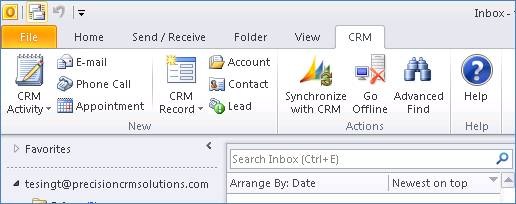
Outlook Toolbar
Microsoft has gone out of its way to make sure the upgrade process is seamless. Below are videos regarding how the upgrade process will work, and what you should expect during the process, in addition to several free videos on the new features set included within MS CRM 2011.
Upgrade Process Videos:
http://offers.crmchoice.com/crm2011-upgrade-videos
A list of additional videos on “how too” in MSCRM you can go to this location
http://rc.crm.dynamics.com/rc/2011/en-us/on-prem/5.0/video_resources.aspx
Finally there are additional help aids and videos at the following location.
http://rc.crm.dynamics.com/rc/2011/en-us/on-prem/default.aspx
Ok so like any other upgrade a few items to note, the new interface does not look like V4.0, it is much better. The first time I logged into the application, I said to myself, oh my, I will have to train myself all over again. Then I looked at the ribbon, (see below) and realized that it looked like the Office applications, (2007 and 2010 of course). You know what? The ribbon works the same also. It takes a bit getting used to, but after about 5 minutes exploring I saw that it wasn’t really that different, fact is it was very familiar to me and easier to navigate.

CRM Contact Level Ribbon
There are so many other navigational features within CRM 2011 that will make your working experience more efficient, as well as your co-workers. I will focus in later articles on just what these areas are, and how using them, pointing our areas that will add value to your organization.
Finally the analytic possibilities are endless. For example, you or your employees can build dashboard objects that contain their own personal views. See below. The information has drill down capabilities which will make working with the native records underneath easier to access. (It took me about an hour to put this together the dashboard below, this was my first try, now that I know how to do it, I would estimate about 10 minutes once I gather the requirements. There is a great video on how to build dashboards at the locations mentioned above),
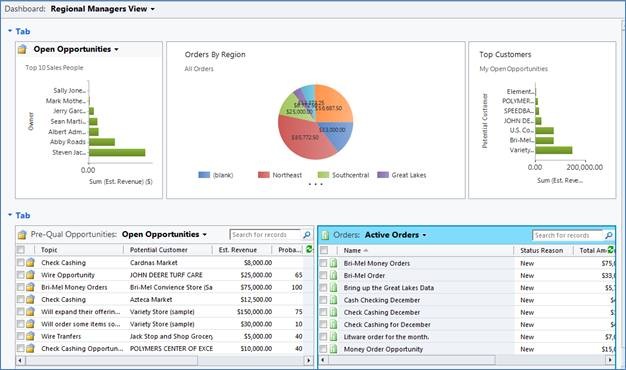
Regional Managers Dashboard
In conclusion, this hype about this new version of MS CRM 2011 isn’t unfounded, like Microsoft says, this product is “A Game Changer.” The product has a familiar look and feel and easier to navigate. That being said, I wouldn’t go into the upgrade unprepared especially if you are working with a number of different versions of the outlook client. Do your research and planning, make sure to go though some of the videos, and have your users go through the basic ones so the new interface isn’t shocking to them. One item you can be assured of, the upgrade from V4.0 to 2011, the application, will be painless.
My very best,
Steven
You can contact me with questions or comments at sjacobowitz@ciber.com .


 Steve's Site Innovation, Transformation, Change, Growth, Culture Building, Learning