
It has come to my attention through the blog posts that most contributors are primarily focused on customizing, (extending) CRM 2011 using code. For the non-technical, such as myself, I find some of these processes and methodologies a bit overwhelming.
Yet, it appears there can be more done configuring Microsoft CRM 2011 through the user interface to assist the common user or administrator handle everyday use cases, or business processes without the use of custom code.
My submission today will deal with when to use of the Option Set, (List Box attribute), to extend the functionality of CRM to meet your current business needs.
Some basics:
One of the field types available within the CRM paradigm is called an option set, (for better understanding a List Box) attribute. It is advisable to use a list box in the case where you have standardized input into a field on one of the forms in CRM 2011. For example on the Account Entity you might want to identify the type of business you are entering into your database. For Example, Suspect Company, Prospect Company, Customer, Client.
The benefits of using Option Sets include:
- Ease of data entry, you can pick the type from a list and the field will be populated.
- Standardization – Only items in the list are available for use
- Reporting and filtering, since these lists are pre-populated the spelling of the values will remain consistent; therefore it will be easier to work with the data during the analysis phases.
A few drawbacks with using Option Sets:
- Security Issues – In order to add additional values to the option set the user must be assigned the customizer role within CRM, which might violate governance rules within your company.
- Maintenance – A list box will only be as good as the number of permutations of entries, for example, if a client was of type A and type B you would have to have a list box entry for Type A and B.
- Multiple Entries – As is implied above Multiple Entries aren’t allowed in a list box entry, (there are a number of non-programing methods for handling this type of situation which I will discuss in future blog entries.
- Reusability – In CRM 2011 you can create an Option Set that can be accessed from several entities although in order to maintain the set the user will still have to have access to the Customizations Section of CRM, therefore it might be unacceptable based on your company’s policy of governance.
Creating a Simple Option Set:
- From the form view Click on New Field under the Field Explorer, (1):
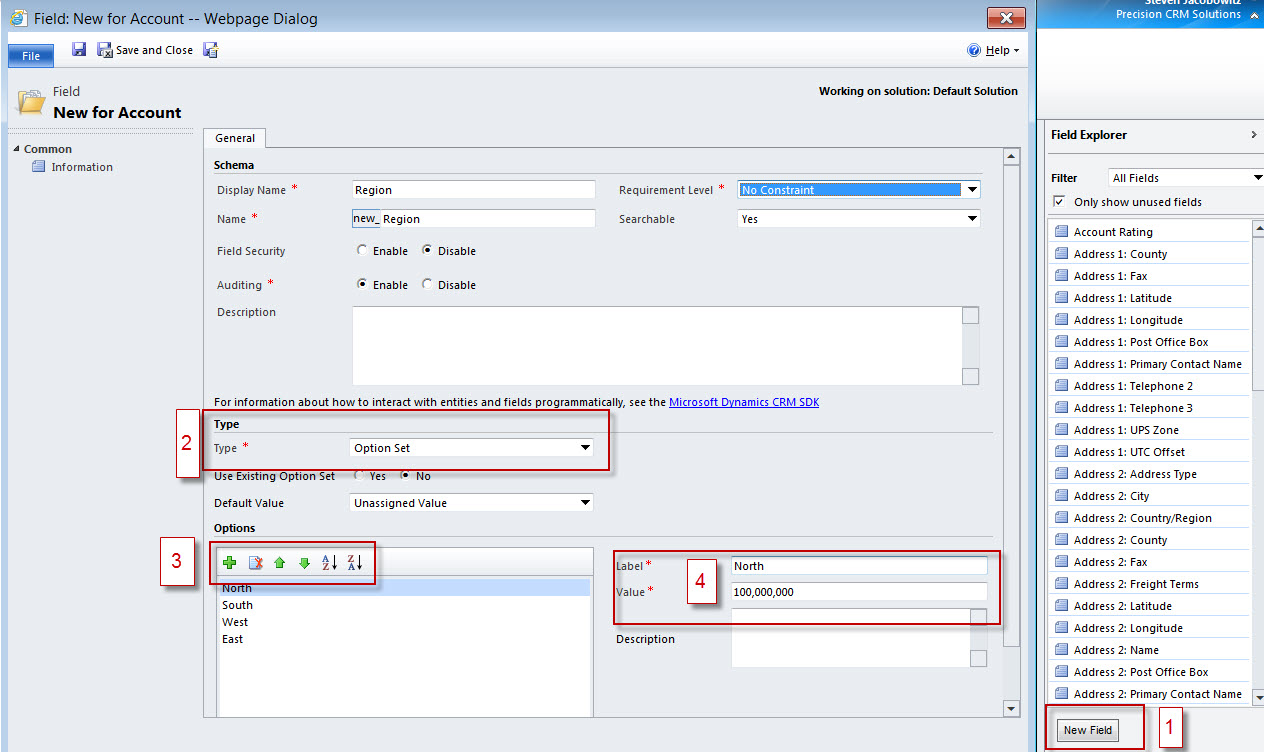
- When defining the field type select Option Set, (2),
- In order to add a new Label and Value click on the plus sign under options (3),
- Define the Label with your custom text (4)
- Place the field on your form, (5)
- Save the form and then publish, (6)

- Your Option Set is now available for use on all records:

Creating Option Set fields on CRM forms assures consistency of data entry. This is valuable when you want to segment the records based on these values either through reporting or views. One of the major drawbacks using this field type is in maintenance of the entries. A user would have to be defined as a system customizer in order to access the field to add additional values. In addition, using this method, only one entry can be populated into the field, therefore you would have to create combinations of entries should more than one option be appropriate.
My next submission will focus on another method of configuration addressing the user role issue. Part three will focus on methodologies to address the multiple entry issue.
Until next time,
Steven


 Steve's Site Innovation, Transformation, Change, Growth, Culture Building, Learning