
Note: This addresses both On Premise and On Line
Microsoft released Dynamics CRM 2015 on Wednesday November 26, 2014, both the On-Premise and the On-Line Versions. For the next few posts I will concentrate on some of the things I had to find by trial and error.
My first was how do I add a new user? When I went to the Administrative Section under settings I noticed the user link was missing. After some hunting I found it under a new navigation section called Security.
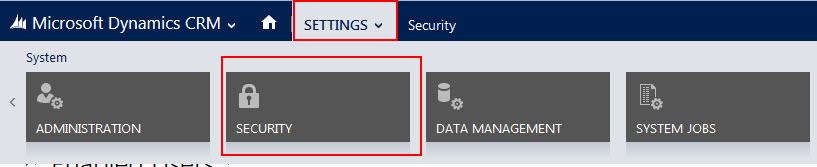
Security Section Access in CRM 2015
As you can see below some of the featurs from Administration section has been moved to Security. Including, Users, Security Roles, Teams and Business Units.
These features work exactly as before, they are just located in this new section.

Security Section Features
In addition, there are several new CRM 2015 features located on the security tab:
Field Security Profiles
Postions
Hierachy Security
Access Team Templates
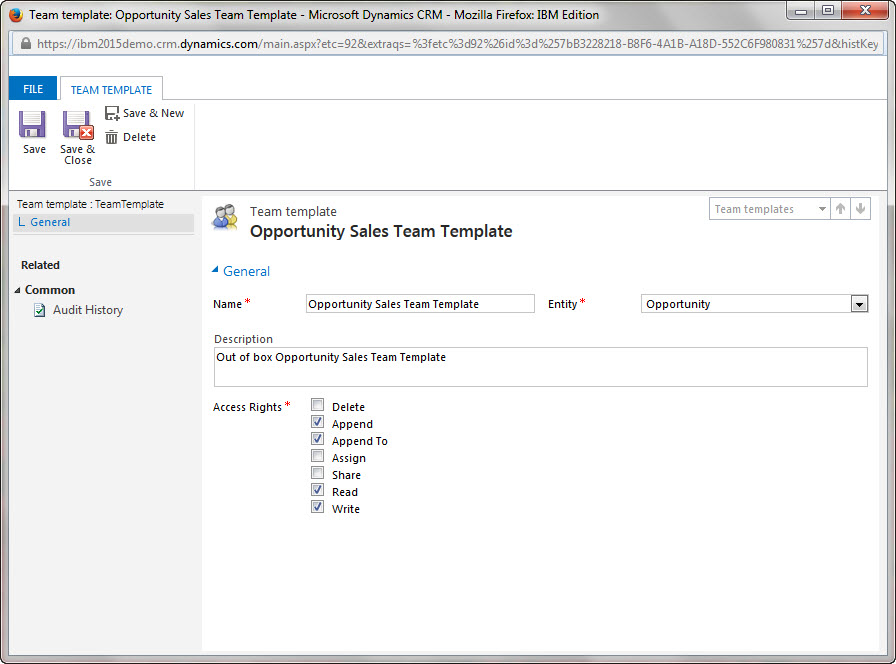
Access Templates Administration
About Access Team Templates:
There are two types of teams that you can work with: owner and access.
- An owner team owns records and has security roles assigned to the team. The team’s privileges are defined by these security roles. In addition to privileges provided by the team’s security roles, users have the privileges defined by their individual security roles and by the roles from other teams in which they are members. A team has full access rights on the records that the team owns.
- An access team doesn’t own records and doesn’t have security roles assigned to the team. The users have privileges defined by their individual security roles and by the roles from other teams in which they are members. The records are shared with an access team and the team members are granted access rights on the records, such as Read, Write, or Append.
An access team can be created manually (user-created) or automatically (system-managed). You can share multiple records with a user-created access team. A system-managed team is created for a specific record and other records can’t be shared with this team. For system-managed teams, you have to provide a team template that the system uses to create a team. In this template, you define the entity type and the access rights on the record that are granted to the team members when the team is created. A team template is displayed on all record forms for the specified entity as a list.
More about Access Team Templates at the following location:
I will cover Field Security Profiles, Postions and Hierachy Security in subsequent posts.
Thanks!
Steven


 Steve's Site Innovation, Transformation, Change, Growth, Culture Building, Learning