
Good Day All-
Sorry for missing the last two weeks. Was at Convergence 2015 and it threw me out of schedule.
For those who haven’t been watching the transition, last year during the spring release of CRM 2013 Microsoft started a changeover in Microsoft CRM service module from support based on contracts to support based on entitlements.
Old Method Using Contracts:
Using the old model you could create new contracts based on contract templates. These define some information, such as allotment types, before you actually write a contract. You can create contracts only for existing accounts and contacts.
A contract has the status of draft until it is invoiced. Each new contract is assigned a unique ID that cannot be used for another contract, unless the contract is being renewed. When renewing a contract, the contract is saved as a draft with an ID that corresponds to the original contract. (1)
New Method Using Entitlements:
During the spring release of CRM 2013 Microsoft CRM moved from the Contract model to the Entitlement Model.
Entitlements like contracts define what kind of support your customers are eligible for by creating entitlements in Microsoft Dynamics CRM. With entitlements, you specify the support term based on number of hours or number of cases. The customer’s support level can vary based on the product or service that the customer has purchased. Customers who’ve purchased different products can be entitled to different support levels. This information helps the customer support agents verify what the customers are eligible for and accordingly create cases for them. (2)
The interesting difference between contracts and entitlements are in the later you can define Omni Channel support, for example, Email, Phone, Facebook, & Twitter. In the former this is not available. Also on entitlements you can also designate multiple company contacts that are allowed support, where as in the contract this is also not possible.
Inconsistencies for New Users of CRM:
There are a few inconsistencies on the user interface of a new Online CRM instance, for example:
If you go to Settings -> Templates the contract template option is still currently available on the window.
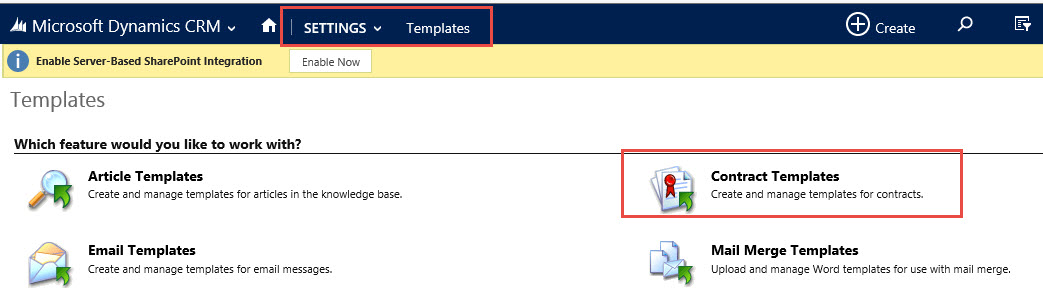
I am sure this has been left on the CRM 2015 window for those who have been using contracts from 2013 back, although, because this was a new instance of CRM 2015 online I am not sure why this object still remains on the Template window. In Addition, the Entitlement Template is not currently available on this window, which you can access from the Settings->Service Management Tile.
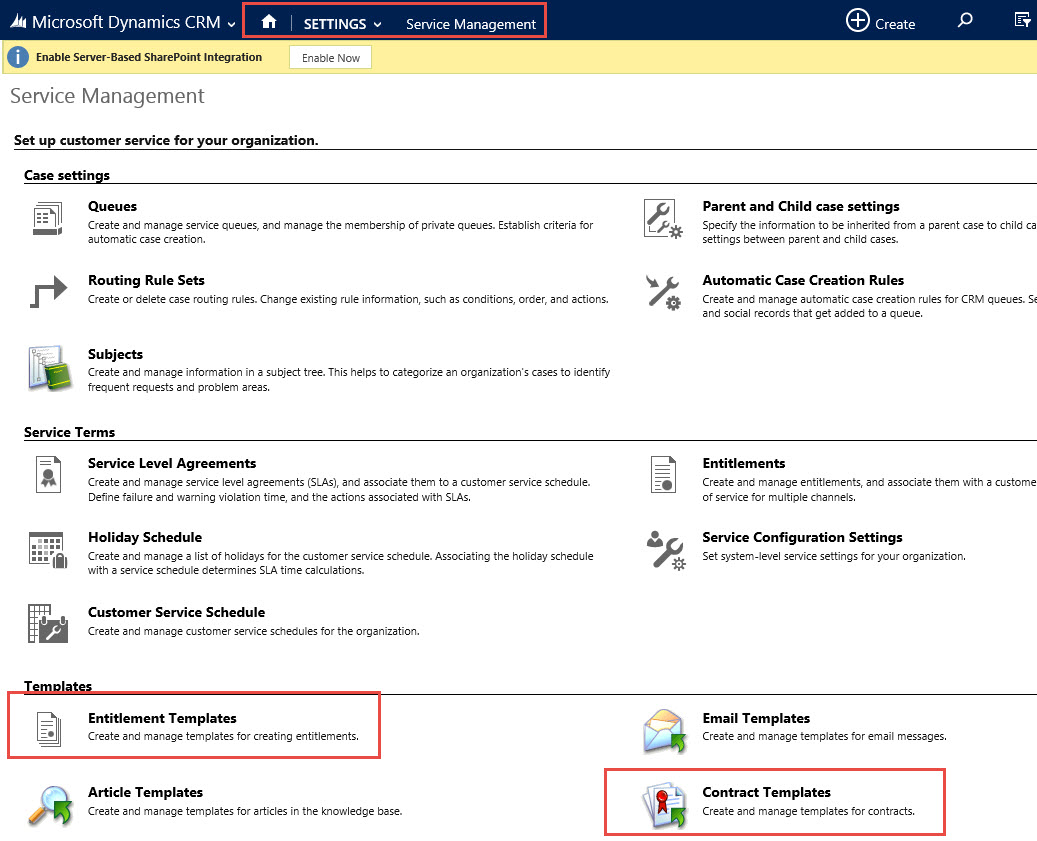
As you can see from above illustration, the Contract Template is also available on this form.
What is further confusing is if the business decided to use Contracts instead of Entitlements unless you are a developer and know how to put the contract tile on the menu, Out of the Box, the tile is not associated with the Account or the Contact.


At the Case Level Contracts are still available on the form itself.

Don’t confuse my pointing this out these inconsistencies, the argument is if Microsoft is going to an Entitlement Model when a new implementation of CRM is created online for a new customer, the Case Management should not be available unless the client requires that paradigm which should be part of the initial set up of the application rather than what is current available.
Regarding Entitlements:
As previously articulated Entitlements define the type of support your customers are eligible from your support center in Microsoft Dynamics CRM. With Entitlements, you specify the support term based on number of hours or number of cases. The customer’s support level can vary based on the product or service that the customer has purchased. Customers who’ve purchased different products can be entitled to different support levels. This information helps the customer support agents verify what the customers are eligible for and accordingly create cases for them.
In addition, you can also specify the channels of support that are available within the Entitlement. For example, Phone, Email, Web, Facebook and Twitter. Within an entitlement template you must specific the total terms, (how many cases or how many hours) and you further can specify the number of cases or hours by each channel of communication. Please note the total entitlement channel cases do not have to equal the total terms when creating an entitlement template. A key difference is you can designate multiple company contacts permitted to initiate cases based on their allowable entitlements.
Scenario:
Our Bank Fraud Department wants to use Microsoft CRM 2015 for case management. They want to start by tracking client reported customer cases with respect to bank issued credit cards. The bank issues credit cards to customers and would like to attach a yearly entitlement sufficient to address any issues their client’s might have with respect to their card. They would like to use entitlements to track all issues related to the customer owned credit cards.
Execution:
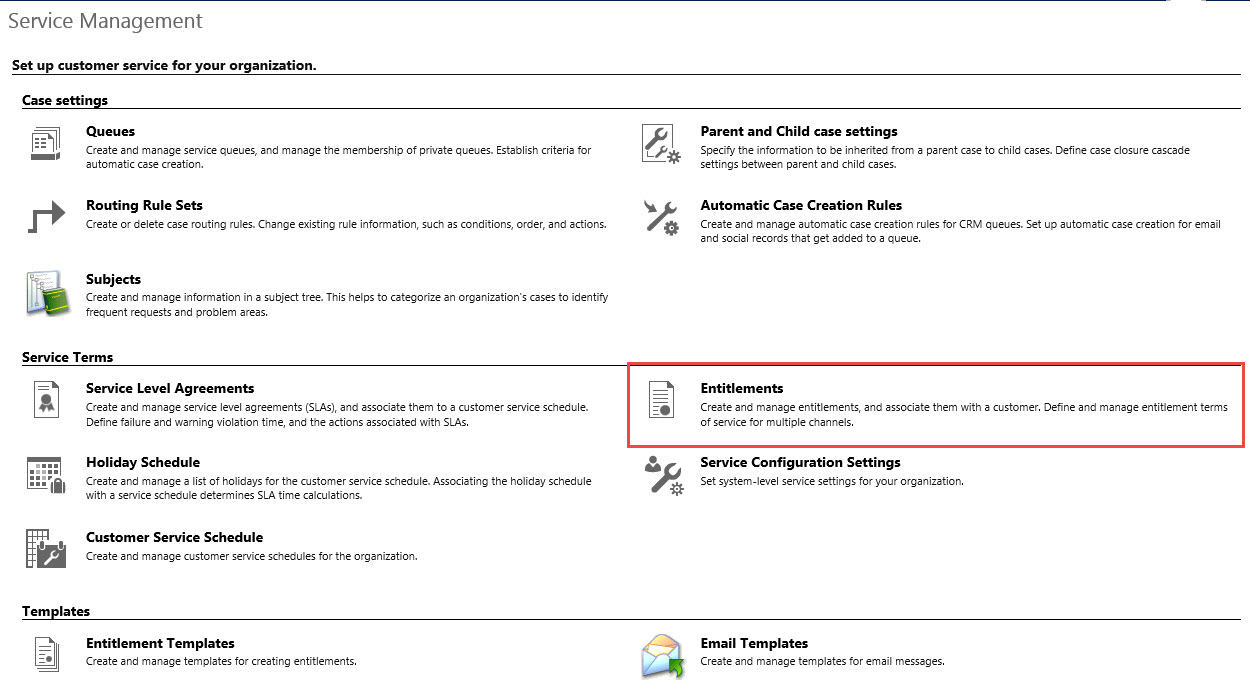
You can begin by creating an Entitlement Template. Navigate to Settings->Service Management Tile
Click on Entitlement Templates
Click on the + (New) Option
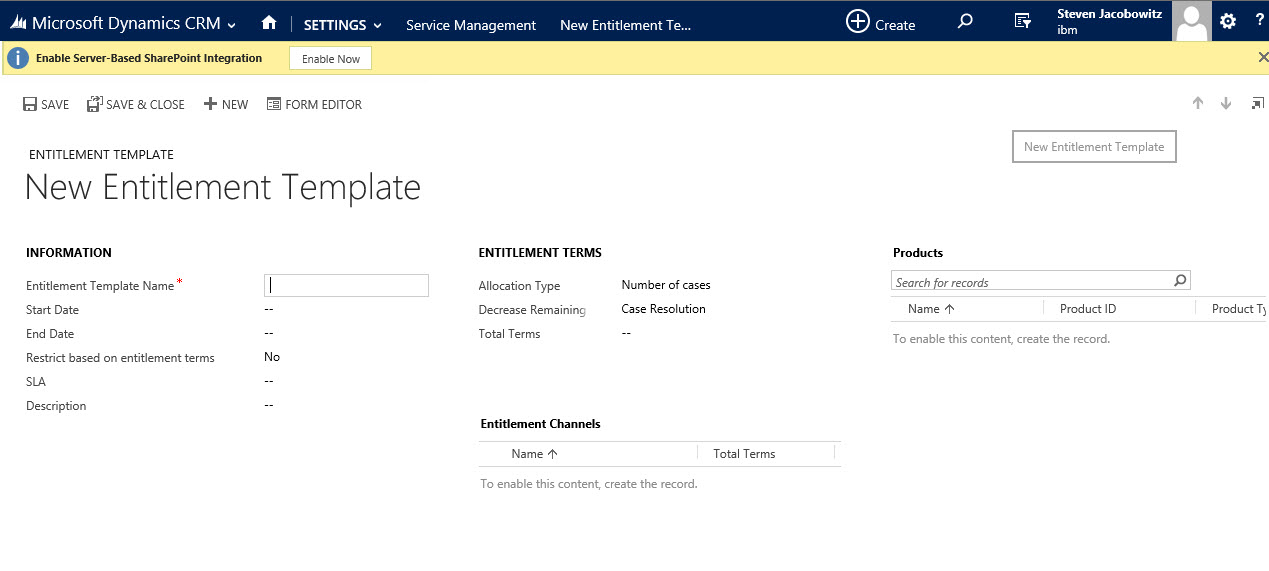
Now fill in all pertinent information into the form and click on save.

Since we require the entitlement to be associated to the client once a Credit Card has been issued we should modify a few additional items.
As soon as a credit card is issued to a client we should have a method to automatically assign the entitlement to the account record. In order to do that we have to create a trigger on the client record and a workflow to instantiate the trigger.
Our first step is to create a new attribute on the contact record to indicate a credit card has been issued to the client. In this use case I am going to use two option attribute.

Save the form and then publish.
NOTE: Next step is to modify the entitlement form. The reason this is being pointed out; In order to use an entitlement template, you must have the ability to assign the entitlement template to a customer’s entitlement. Out of the box the entitlement template attribute has not been added to the entitlement form.
Until I stumbled upon this hidden attribute, I was under the impression you could only assign a template to an entitlement from the Setting->Service Management -> Entitlements Section. This was cumbersome because from this section you would have to search for the customer.
At the Account or Contact level -> Entitlement Tile you could not use the functionality of the template. Once you add the Entitlement Template attribute to the Entitlement form this limitation is eliminated.

Our next step is to create a workflow to automatically assign the entitlement to the customers who own our Bank Credit card.
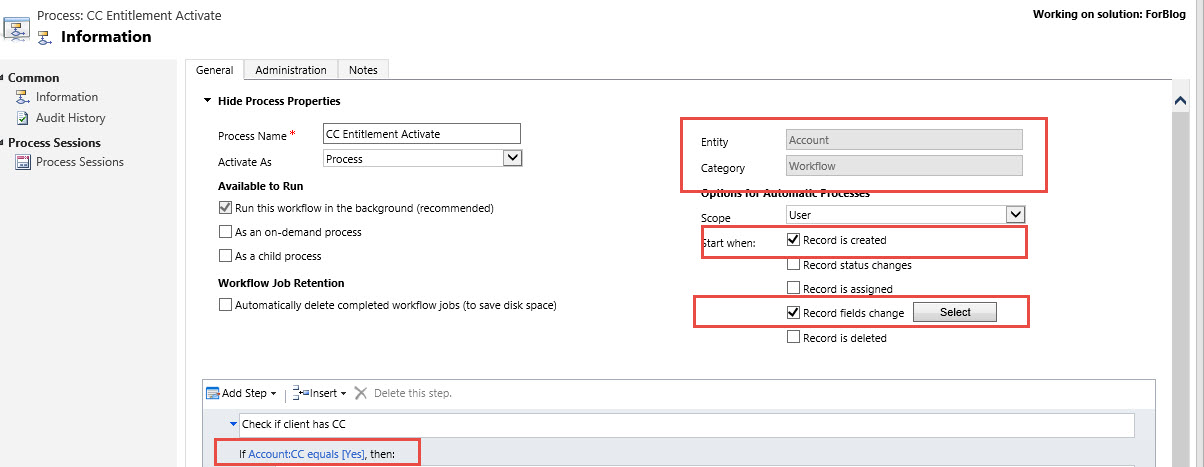
First step is trigger of the CC attribute we created when the option is set to YES. We can do this two ways both on Create of the client record and also on the modification of the CC attribute. We will then set the condition to instantiate if the CC is = “YES”
Next step would be to create the entitlement record automatically when “YES” option is set.
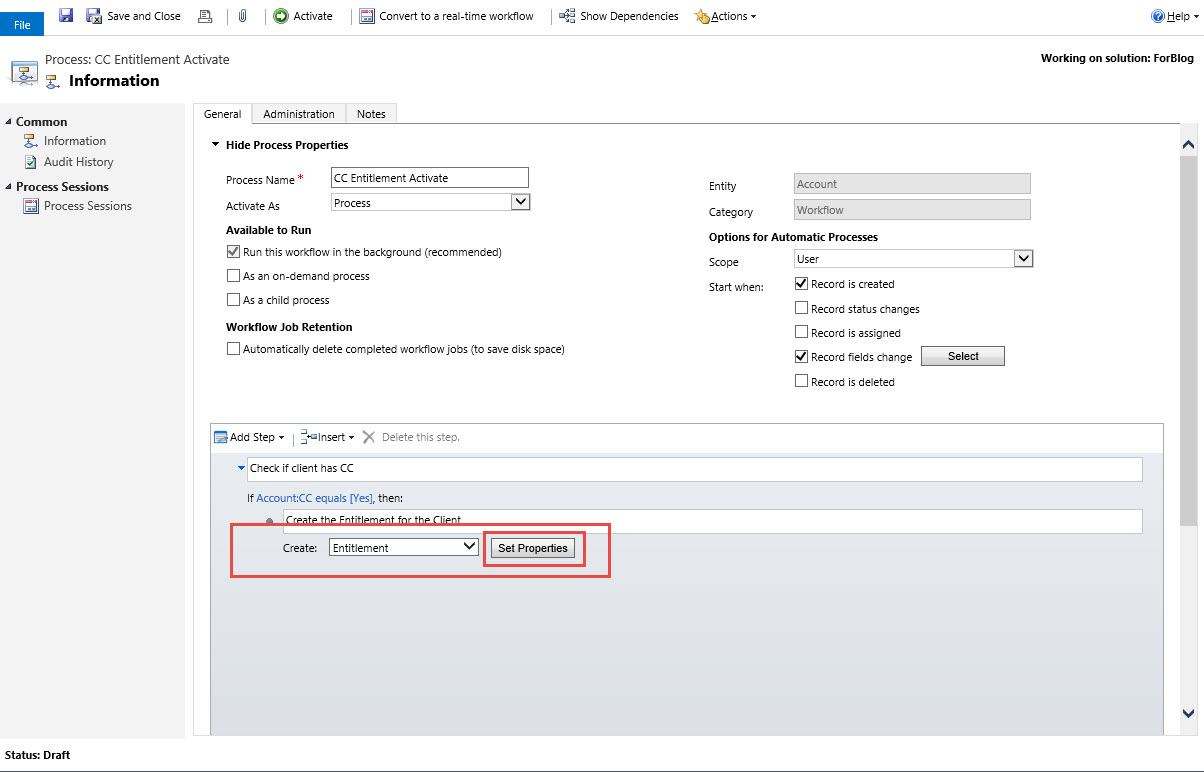
As you can view because we have the entitlement template attribute on the form we can set the proper template to be selected when the company record meets the trigger criteria.

Set the new entitlement to active
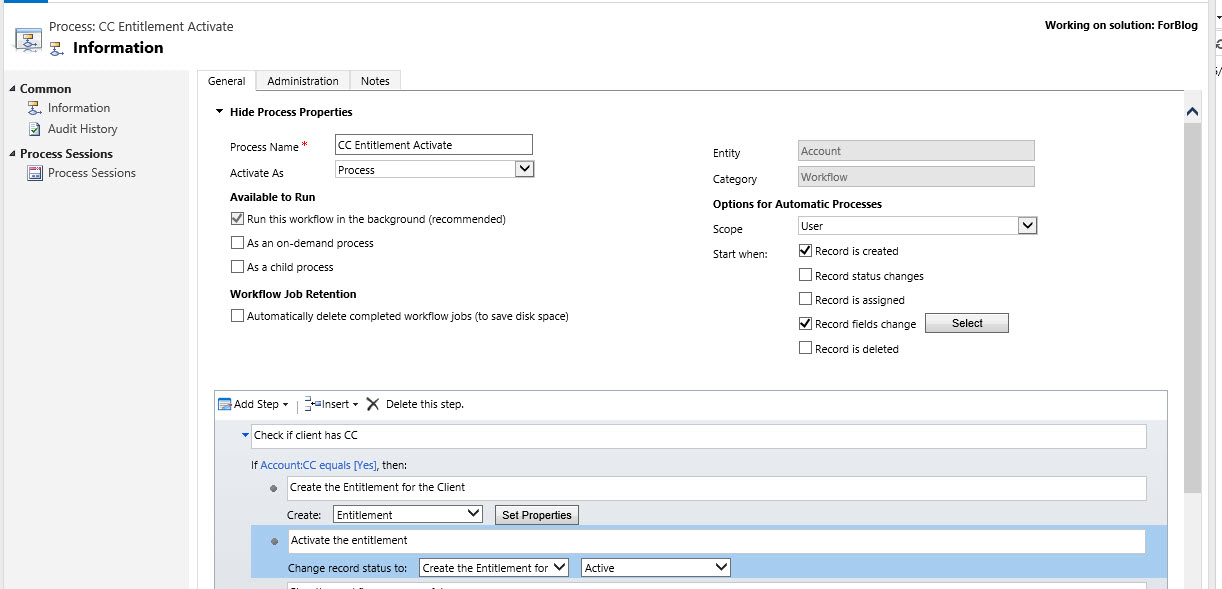
Create the actions to stop the workflow under both conditions.
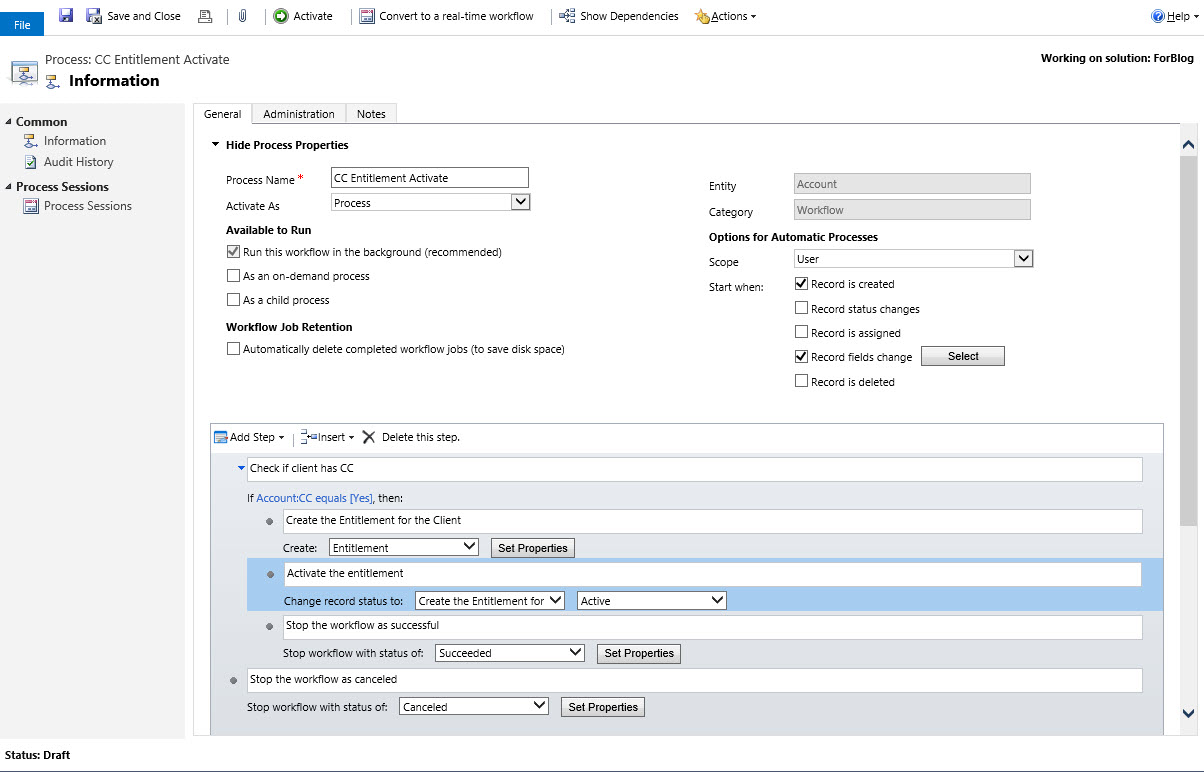
Save and activate the workflow.
Finally there is one more step you might want to take in this process. Since we placed the entitlement attribute on the form and used it in creating the clients entitlement for the credit card we would want to lock out input once the attribute has been populated. we can accomplish this using the following business rule.
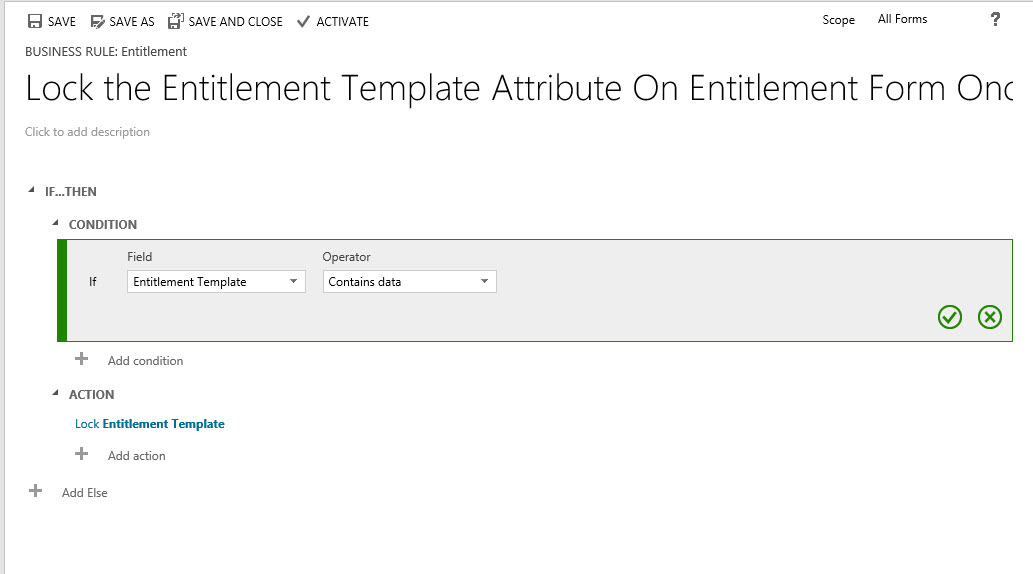
Activate the business rule once created.
Let’s test this new paradigm out. We just issued a credit card to the Burk Family. Our agent sets the Credit Card attribute from “No” to “Yes” on the Account Record.

As you can see our workflow fired off the trigger and created an entitlement for the Burk Family.

Susan Burk calls into Customer Service because she is having trouble activating her new card. Our agent can create a new case and automatically attach the entitlement to the case using the quick create form.
Our agent can then perform the customer service and first call resolution on the open case. Then Resolve the case.


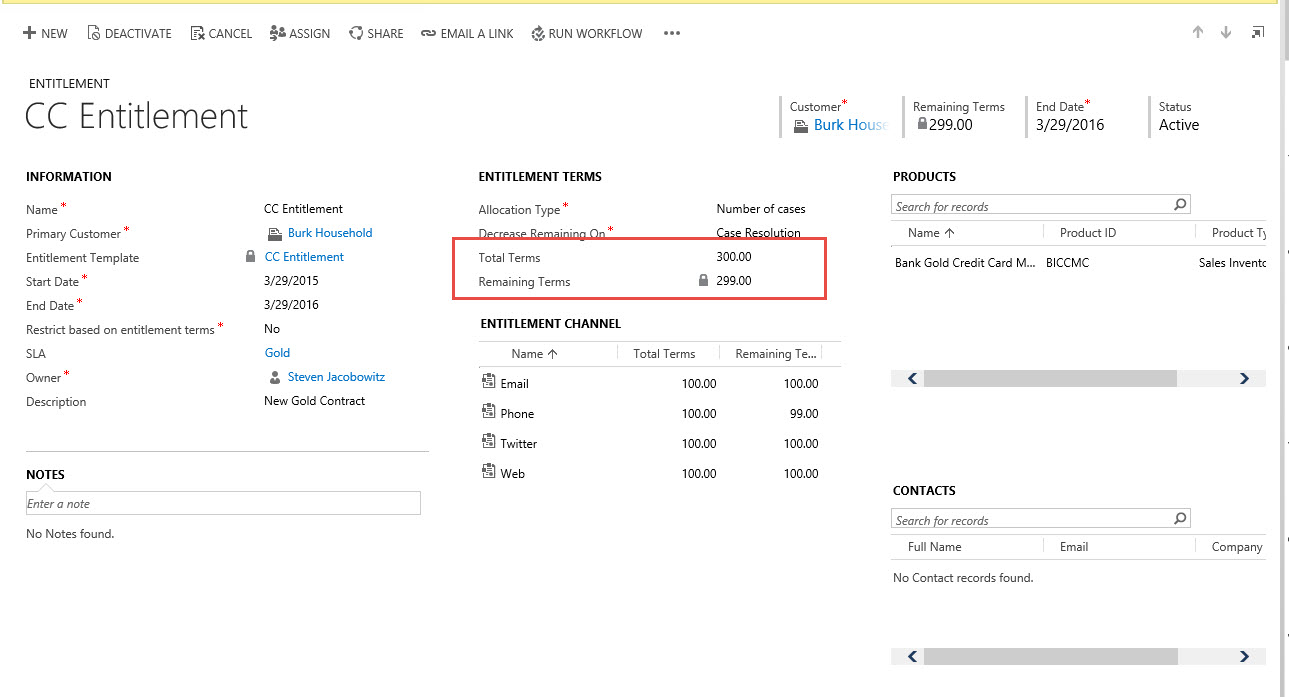
If you go back to the customer’s entitlements you can view the entitlements remaining decremented from 300 to 299.

In conclusion, Entitlements can be deployed in lieu of Contracts starting in the spring release of CRM 2013 and CRM 2015 first release. One last challenge I wanted to mention, the Entitlement Templates are still not assessable under the Settings -> Template Tile, you can only access under the Settings -> Service Management Tile under Entitlement Templates.
This functionality will allow you to assign a number of cases a customer will be entitled to based on the origination channel and the timeframe allowable.
I hope you found this useful.
As always,


 Steve's Site Innovation, Transformation, Change, Growth, Culture Building, Learning
Hi Steven, Thanks for the in depth use of entitlements. Does this mean that in future, Contracts will become obsolete? If you have a scenario where the Account/Contact have a renewal subscription to your service, what would be the differentiating factor in using entitlements versus Contracts in CRM 2015? These details (contracts/entitlements) are subsequently synced with ERP (Dynamics AX) billing system. I appreciate your advice. Thanks
I am not certain the direction Microsoft will take in the future, although, I don’t see the contract functionality disappearing any time soon because many organizations have used have configured Microsoft CRM using this paradigm.