Hello!
I am going to take the lazy way out this week. I was poking around the help files on line and noticed Microsoft has already started articulating the new features due out on the spring release for Microsoft Dynamics CRM 2015. Microsoft is on a frenetic pace of adding additional value to CRM. The features below is from the documentation I discovered on their help site.
Please note: This topic is prerelease documentation and is subject to change.
The release is called Microsoft Dynamics CRM Online 2015 Update 1. That’s right folks, Microsoft continues to make the shift to their SAAS model by releasing to online only. They will catch up the on premise version of CRM 2015 during their next submission.
1. Improved Navigation and user interface options: Increase adoption with improved user experience, including new UI themes and faster navigation to records.
With the new navigation bar, it’s easier and faster to find the information you need. When you choose the Main Menu from the navigation bar, you can access your work areas, records, or other items with less scrolling and fewer clicks than before.

Take a short video tour (less than one minute) of the new navigation
Use the Recently Viewed Items  button on the new navigation bar to get back to your most recently viewed and pinned items. With this global tool, you can access recently viewed records, views, and even dashboards. Pin the items you use all the time to move them to the top of the list.

If you’re working in a complex form with lots of fields, the new form navigation drop-down list makes it easy to get to just the data you need. Choose the drop-down list next to the form title, and then select the section of the form you want to go to.

2. Add a logo or change the color scheme using themes
Create a uniform look and feel across all your applications with themes. For example, add a company logo or change default colors for entities or links. Preview your custom theme, and then publish it for the whole team when you’re ready. No code required!

Watch a short video (2:45) about themes
More information: TechNet: What’s new for administrators and customizers
3. Immersive Excel experience: Now you can use Microsoft Excel Online to do quick analysis right from CRM Online. To help increase productivity, Microsoft is providing the ability for salespeople to conduct analysis in Excel, directly within Microsoft Dynamics CRM. This eliminates the time and effort required to switch between applications in the middle of completing a business process. Salespeople can now view sales data in familiar Excel spreadsheets, perform what-if analysis, and upload the changes, all while maintaining the work context.
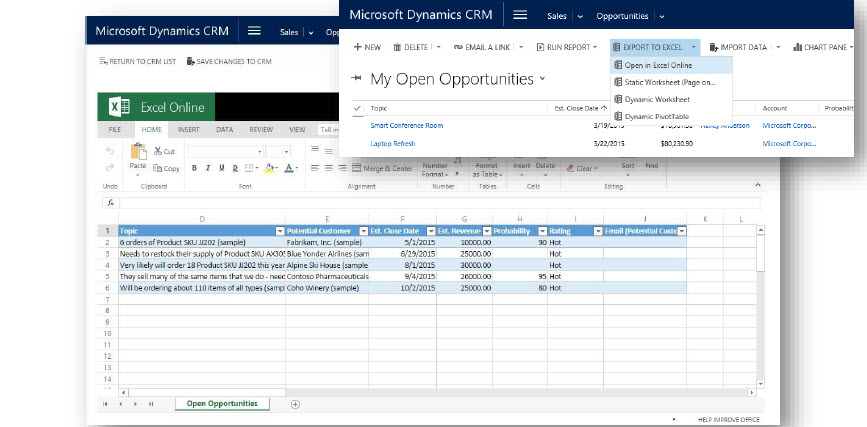
4. Excel export completely redesigned. With a single click, you can export to Excel anywhere, including the desktop version of Excel (2007 and later), Excel Online, and other Excel clients.Microsoft redesigned exporting to Excel from the bottom up to provide for a much smoother experience. With a single click in the web client or in CRM for Outlook, you can export your data as an Excel document, which can be opened anywhere, including the desktop version of Excel (2007 and later), Excel Online, and other Excel clients. When you export, all formatting is preserved, so you can do your calculations in Excel, and then reimport the data to CRM. You can export up to 100,000 records at a time (previous limit was 10,000).
Do quick analysis with Excel Online, right from CRM Online
With this release you will now be able to use Microsoft Excel Online to do quick analysis, right from CRM Online. For example, if you’re a sales manager, you might want to analyze the opportunities your team owns and review Key Points of Interest (KPIs) to see how you can assist your team members. If you’re a sales rep, you can open your opportunities in Excel and do what-if analysis for different incentive scenarios.

Note
You must have an Office 365 subscription to edit Excel documents in Excel Online.
5. Embedded OneNote: Capture photos, take voice notes, do free-form drawings, and more. Everything is automatically linked with the record in CRM Online.
Take advantage of all that Microsoft OneNote has to offer, directly from CRM Online. For example, when you’re on the go at a customer site, take notes on your Microsoft Surface or other mobile device while you’re viewing opportunity details. Everything is automatically linked with the opportunity record in CRM Online.
OneNote integration will benefit salespeople since they will be able to share information more easily with OneNote embedded inside Microsoft Dynamics CRM. They can create and view notes containing text, photos, voice, spreadsheets, and free-form drawings, all within the context of the account, opportunity, or any other CRM record they are working on.
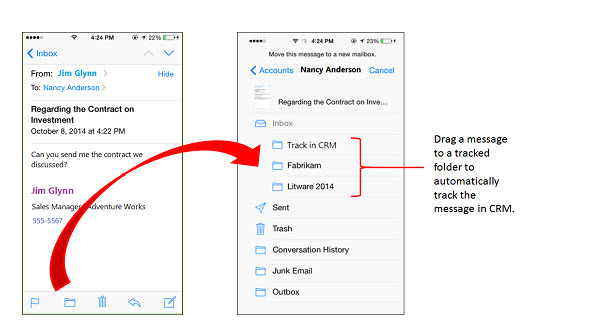
6. Track email by folder: Folder tracking provides a new and intuitive way to track incoming email activities on any device that supports Exchange. Now you can track your email directly from virtually any device.Microsoft Dynamics CRM Online 2015 Update 1 provides a new and intuitive way to track incoming Exchange email activities. You can set up a tracking folder—use any Exchange folder in your Inbox—and then drag an incoming email message to that folder to track it. You can associate a tracked folder with a specific record, such as an account or opportunity, so whenever you move a message to that folder, it’s automatically linked to that specific record. Tracked folders work with Exchange Inbox rules, which makes it even easier to manage and track incoming email. For example, you could set up an Exchange Inbox rule that automatically routes email from a Contoso contact to a tracked Contoso folder, linked to a specific opportunity. Tracked folders work on any device that supports Exchange, so you can track email directly from virtually any device.
7. Social sales: Define rules for creating or updating CRM records from incoming activities. For example, you can now generate leads or opportunities from social posts.
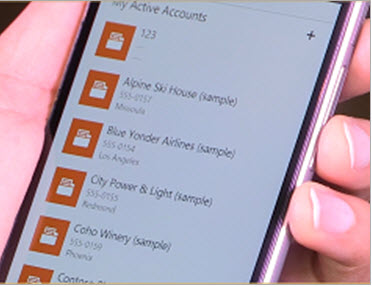
8. Mobile sales: With the new CRM for Phones app, enjoy the same great mobile experience on your phone as you do on your tablet. Nurture your leads and opportunities through the sales process with the new intuitive interface.
The CRM for phones app now provides the same process-driven experience as CRM for tablets. Nurture your leads and opportunities through the sales process with the new intuitive interface. If you have a Windows Phone, use Cortana voice commands to access your CRM data hands-free. More information: CRM for tablets and phones
9. Integrated Parature knowledge base: Empower agents with knowledge base integrated into daily service interactions, including the ability to both search and receive automated suggestions.
Your customer service agents, can take advantage of rich Parature knowledge base (KB) capabilities to reduce issue handling time, directly from CRM Online. For example, while you’re working on a case record, you can:
- View system-suggested KB articles
- Search for relevant KB articles
- Read the content of KB articles inline, including embedded images or videos
- Send KB article links to customers

Note:
You must have a Parature subscription in order to take advantage of this feature.
10. Mobile Case Management The Dynamics CRM application for tablets and phone will now support the CRM Case functionality enabling agents to manage their cases on the go.
11. Speed up customer service with default entitlements
Customer service agents use entitlements to verify the type of support a customer is eligible for and to provide the right level of support. Now service managers or admins can set an entitlement as the default entitlement for a customer. When an agent creates a case, the default entitlement is automatically associated with the case, saving time for the agent.
For cases where service organizations do not want entitlement terms to be deducted (a faulty part is installed, for example), service agents can also credit back entitlement terms so the customer isn’t charged.
12. Define rules for creating or updating CRM records from incoming activities
In previous versions of Microsoft Dynamics CRM, Service Managers could set up rules to automatically create cases from incoming email or social channels. Now sales, marketing, and service teams can use these same rules to automatically create or update one or more records from any single incoming activity, such as an email, social, or custom activity.
13. Find and engage more qualified buyers with Insights for Microsoft Dynamics CRM
Boost your sales close rates with information that helps you find, understand, and engage more qualified buyers with Insights for Microsoft Dynamics CRM, powered by InsideView. The Insights pane (which is added to the Accounts, Contacts, Leads, and Opportunities forms), pulls in company, contact, and social data from thousands of constantly updated sources. More information: Insights for Microsoft Dynamics CRM – powered by InsideView.
14. Create Office 365 Groups: Collaborate with team members who don’t have access to CRM Online with Office 365 Groups.
Office 365 users can use Groups to collaborate across Office products. A Group is a workspace that team members can use to share files, email messages, conversations, calendars, and Microsoft OneNote notes. Groups are a great way to collaborate with team members, even if they don’t have access to CRM Online. For example, create a group for your sales team, invite other Office 365 users to join the group, and then share documents, email, conversations, meeting information, and OneNote notes related to specific opportunities. More information: Tell me more about Groups in Office 365
For example, create a group for your sales team, invite other Office 365 users to join the group, and then share documents, email, OneNote notes, and more.
There are a great deal of new features surrounding CRM On-Line that will benefit your end user experience. Microsoft commitment to making CRM On-Line a more robust product is apparent. For those users of On Premise Microsoft will eventually catch you up, most likely, during the fall release so do not despair.
Really the menu changes more represent the menus found on Microsoft Dynamics Marketing and Microsoft Social Engagement, (formally Microsoft Social Listening). This feature alone is well worth the upgrade. No more scrolling to the right in order to see the full application.
This is a feature in and of itself a vast improvement and should be made available to the On-Premise users As Soon as Possible.
How about it Microsoft?
My best,


 Steve's Site Innovation, Transformation, Change, Growth, Culture Building, Learning